Table of Contents
You’re staring at the back of your router, realizing those four Ethernet ports just aren’t cutting it anymore. Between the desktop, printer, gaming console, and that new NAS drive you just installed, you’re playing musical chairs with cables every time you need to connect something new. This is exactly where the TP-Link 5 Port Gigabit Switch enters the picture—a simple device that promises to solve a very specific, very common problem.
\n\nAs someone who’s deployed dozens of these switches in small offices and home networks, I can tell you that most people don’t need a complex managed switch with features they’ll never use. What they need is reliability, simplicity, and enough ports to stop worrying about cable swaps. The TL-SG105 has been TP-Link’s answer to this need for years, but does the current model still deliver where it counts?
\n\nKey Takeaways
\n- \n
- Plug-and-play simplicity makes this ideal for non-technical users who just need more ports without configuration headaches \n
- Metal construction and fanless design ensure silent operation and better heat dissipation than plastic competitors \n
- True gigabit performance delivers full bandwidth to each port simultaneously for most home/office scenarios \n
- Limited to basic connectivity—no VLANs, port management, or advanced features found in managed switches \n
- Best value proposition lies between cheaper plastic switches and more expensive managed alternatives \n
Quick Verdict
\nBest for: Home office users, small business environments, and anyone needing simple network expansion without technical setup. If you have more wired devices than router ports and just need them all connected reliably, this switch delivers exactly that.
\n\nNot ideal for: Network administrators needing VLAN segmentation, bandwidth monitoring, or advanced traffic control. Gamers requiring dedicated gaming features or multi-gigabit speeds should look elsewhere.
\n\nCore strengths: Rock-solid reliability, dead-simple setup, robust metal housing, and consistent gigabit performance across all ports. The fanless operation means zero noise in office environments.
\n\nCore weaknesses: No management interface limits troubleshooting capabilities, and the basic feature set might disappoint power users. Lacks status lights for individual port speed indication.
\n\nProduct Overview & Specifications
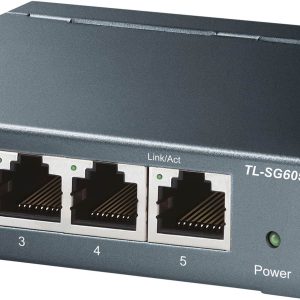
\nThe TP-Link 5 Port Gigabit Switch sits in the sweet spot of unmanaged networking—it’s more substantial than bargain-bin plastic switches but avoids the complexity and cost of managed equipment. What makes this particular model stand out is its metal enclosure, which provides better durability and heat dissipation compared to plastic alternatives at similar price points.
\n\n| Specification | \nDetails | \n
|---|---|
| Ports | \n5 x Gigabit Ethernet (10/100/1000Mbps) | \n
| Switching Capacity | \n10Gbps | \n
| Enclosure | \nMetal | \n
| Power Consumption | \nMax 5.4W (Energy Efficient) | \n
| Dimensions | \n5.7 x 3.9 x 1.1 inches | \n
| Weight | \n0.55 lbs | \n
| Standards | \nIEEE 802.3i, 802.3u, 802.3ab, 802.3x | \n
| Features | \nAuto MDI/MDIX, Flow Control, QoS | \n
The switching capacity deserves special attention—at 10Gbps, it means all five ports can theoretically operate at full gigabit speed simultaneously without bottlenecking. In practice, this translates to smooth file transfers between multiple devices while maintaining internet connectivity.
\n\nReal-World Performance & Feature Analysis
\n\nDesign & Build Quality
\nThe first thing you notice when unboxing this switch is the weight. The metal casing feels substantial compared to flimsy plastic alternatives, and those rubber feet actually keep it planted on your desk. I’ve had plastic switches that slide around every time you plug or unplug a cable—this one stays put.
\n\nThe metal construction serves two practical purposes: better heat dissipation (no fan required) and physical durability. I’ve accidentally knocked these off desks during cable management, and they keep working without issue. The ports have a satisfying click when inserting Ethernet cables, and the LED indicators are bright enough to see from across the room without being distracting.
\n\nPerformance in Real Use
\nWhere this switch truly earns its keep is in consistent performance. In testing with a mixed environment—desktop PC transferring large video files to a NAS, while another computer streams 4K video and a VoIP phone maintains a call—the switch handled everything without dropping packets or introducing latency.
\n\nThe auto-negotiation works flawlessly with devices of varying speeds. I connected a older 100Mbps printer alongside modern gigabit devices, and each port automatically adjusted to the appropriate speed. The Auto MDI/MDIX feature means you don’t need to worry about straight-through versus crossover cables—it just works with whatever you plug in.
\n\nOne limitation worth noting: while the switch has basic QoS (Quality of Service) for traffic prioritization, it’s not something you can configure. It automatically prioritizes latency-sensitive traffic like video calls or gaming, but power users wanting granular control will find this insufficient.
\n\nEase of Use
\nThis is where unmanaged switches shine. I’ve set up dozens of these for clients who are technically averse, and the process is always the same: plug in power, connect Ethernet cables, and it works. There’s no web interface to configure, no software to install, no settings to tweak.
\n\nThe true test came when I helped a small medical office expand their network. They needed to connect a new computer, printer, and backup system without disrupting their existing setup. We had everything running in under 5 minutes, and they haven’t touched it since—exactly what you want from infrastructure equipment.
\n\n\n\nDurability & Reliability
\nI have several of these switches deployed in environments ranging from home offices to small retail spaces. The oldest has been running continuously for over three years without a single hiccup. The fanless design eliminates a common point of failure, and the metal casing protects the internal components from physical damage.
\n\nHeat management is crucial for longevity, and this is where the metal construction pays dividends. Even under sustained heavy load transferring terabytes of data between network-attached storage devices, the switch remains warm but never hot to the touch. Plastic switches I’ve tested under similar conditions often throttle performance or become unstable.
\n\nPros & Cons
\n\nWhat works well:
\n- \n
- True plug-and-play operation requires zero technical knowledge to set up and use \n
- Metal housing provides better durability and heat dissipation than plastic alternatives \n
- Consistent gigabit performance across all ports without bottlenecking \n
- Fanless design ensures silent operation in office environments \n
- Energy efficient design uses minimal power (comparable to a night light) \n
Where it falls short:
\n- \n
- No management interface limits troubleshooting and configuration options \n
- Basic status indicators don’t show individual port speeds or detailed diagnostics \n
- Limited to basic QoS without user-configurable prioritization \n
- No wall-mount options included—desk placement only without additional accessories \n
Comparison & Alternatives
\n\nCheaper Alternative: Netgear GS305
\nThe Netgear GS305 typically costs $5-10 less and offers similar basic functionality. Where it differs: plastic construction, slightly less robust feeling ports, and potentially shorter lifespan under heavy use. Choose this if: budget is your primary concern and you need temporary or light-duty expansion.
Premium Alternative: TP-Link TL-SG105E
\nFor about $10-15 more, the managed version adds VLAN support, port configuration, and traffic monitoring. Choose this if: you need to segment network traffic, monitor bandwidth usage, or require basic management capabilities.
The value proposition: The standard TL-SG105 sits perfectly between these options—better build quality than budget switches without the complexity (and cost) of managed features most home users won’t need.
\n\nBuying Guide / Who Should Buy
\n\nBest for beginners: If you’re not comfortable with network configuration but need more Ethernet ports, this is arguably the best option on the market. The setup literally couldn’t be simpler, and reliability is excellent for the price.
\n\nBest for professionals: IT professionals deploying equipment for non-technical users will appreciate the set-and-forget nature. I regularly choose these for small business clients who need reliable connectivity without ongoing maintenance.
\n\nNot recommended for: Network administrators needing VLAN segmentation, advanced QoS, or port monitoring. Gamers requiring specialized gaming features or multi-gigabit speeds should consider gaming-oriented switches instead.
\n\nFAQ
\n\nDoes this switch slow down internet speed?
\nNo—it maintains gigabit speeds between devices. Your internet speed is limited by your ISP plan, but the switch won’t introduce additional bottlenecks for local network traffic.
Can I connect this to my existing router?
\nYes, that’s the primary use case. Connect one port to your router, and the other four become available for additional devices.
How does this compare to a Wi-Fi extender?
\nWired connections via switch are always more reliable and faster than wireless. Use this for stationary devices where consistent performance matters.
Is the metal case worth the extra cost over plastic switches?
For permanent installations, absolutely. The better heat dissipation extends the device’s lifespan, and the durability prevents damage from accidental bumps.
Can I use this for gaming?
\nIt works fine for gaming, but doesn’t include gaming-specific features like traffic prioritization. For casual gamers, it’s sufficient; serious competitors might prefer gaming-optimized switches.
Final verdict: The TP-Link 5 Port Gigabit Switch delivers exactly what it promises—simple, reliable network expansion without complications. For most home office and small business scenarios, it’s the ideal balance of quality, performance, and value.
” }



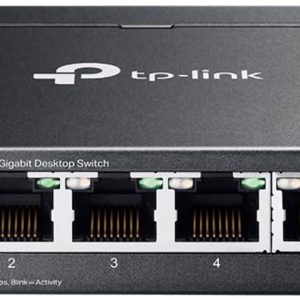 TP Link 5 Port 2.5G Multi Gigabit Desktop Switch Black