Table of Contents
You’re setting up a small office network, installing security cameras, or building out your business infrastructure, and suddenly you realize: basic switches won’t cut it. You need Power over Ethernet to clean up cable clutter, but you also need some control over your network traffic. That’s where the middle ground of smart managed switches becomes critical—and where the ZYXEL GS1900 24EP positions itself as an intriguing option.
Having deployed dozens of similar switches across small business environments, I’ve seen where these devices excel and where they fall short. The promise of managed features without enterprise complexity sounds great on paper, but the real question is whether it delivers in practice. Let’s cut through the marketing and examine what this switch actually brings to your network.
Key Takeaways
- 12 PoE+ ports with 130W total budget works well for typical security camera or access point deployments but struggles with high-power devices
- Smart management features provide essential VLAN and QoS controls without overwhelming non-technical users
- Fanless operation makes it ideal for office environments where noise matters
- Limited PoE budget distribution means you can’t maximize all ports simultaneously
- Web interface is accessible but lacks the depth of fully managed alternatives
Quick Verdict
The ZYXEL GS1900 24EP hits a sweet spot for small businesses and offices needing basic network control with reliable Power over Ethernet. It’s not the most powerful or feature-rich option available, but it delivers exactly what most growing operations need without complexity or excessive cost.
Best for: Small offices with multiple IP phones and security cameras, retail environments with limited IT support, home labs needing VLAN segmentation, businesses transitioning from unmanaged to managed switching.
Not ideal for: High-density PoE deployments (30W cameras/access points), environments needing advanced security features, networks requiring stacking capabilities, installations with numerous high-power devices.
Core strengths: Clean web management interface, reliable performance for typical office workloads, quiet fanless design, competitive pricing for smart managed features.
Core weaknesses: Limited per-port PoE budget, basic monitoring capabilities, no stacking support for expansion, minimal advanced security features.
Product Overview & Specifications
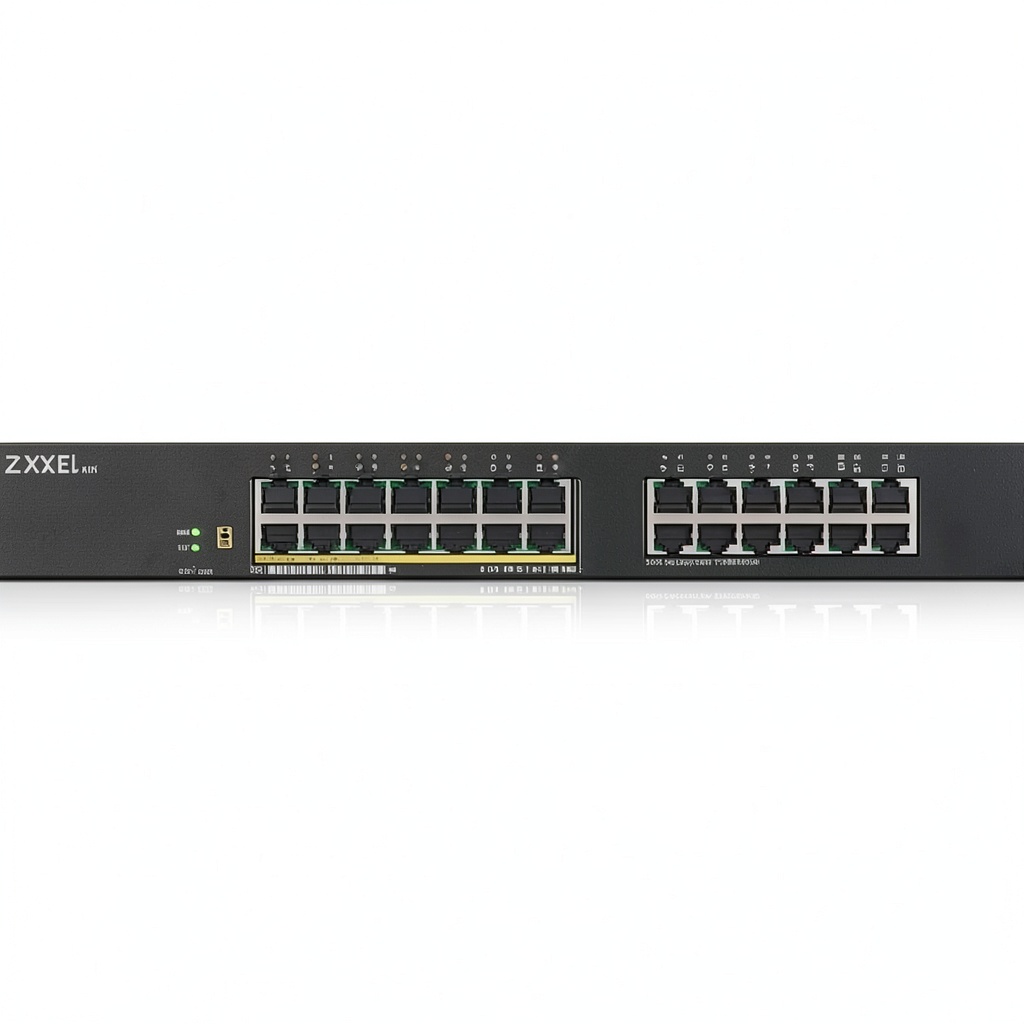
The ZYXEL GS1900 24EP sits in the often-overlooked category between basic unmanaged switches and fully managed enterprise gear. With 24 Gigabit Ethernet ports—12 of which support PoE+—and a total power budget of 130W, it’s designed for organizations that have outgrown simple connectivity but don’t need (or can’t afford) complex network management.
What makes this category interesting is the practical balance it strikes. You get essential management features like VLAN support for network segmentation, Quality of Service for traffic prioritization, and basic monitoring—all through a web interface that doesn’t require networking certification to navigate. The managed poe switch functionality means you can power devices like security cameras and access points while maintaining control over how they communicate on your network.
| Specification | Details |
|---|---|
| Total Ports | 24 x Gigabit Ethernet |
| PoE+ Ports | 12 ports (Ports 1-12) |
| Total PoE Budget | 130W |
| Max PoE per Port | 30W |
| Management Type | Smart Managed (Web Interface) |
| VLAN Support | 802.1Q VLAN, Voice VLAN |
| QoS Features | Basic traffic prioritization |
| Cooling | Fanless design |
| Dimensions | 280 x 150 x 44 mm |
The compact design is noticeably smaller than many competing 24-port switches, making it suitable for crowded network closets or even discreet placement in office environments. Having worked with switches that sound like jet engines, the fanless operation is a significant quality-of-life benefit that’s often overlooked in spec sheets.
Real-World Performance & Feature Analysis
Design & Build Quality
The GS1900 24EP follows Zyxel’s utilitarian design philosophy—it’s not flashy, but it’s built to work. The metal chassis provides adequate heat dissipation for the fanless design, and the port arrangement is logical with clear status indicators. In real deployment, the compact size is genuinely useful; I’ve installed these in retail cash wrap areas and small network enclosures where every inch matters.
Where the design shows its budget orientation is in the physical interfaces. The power connector is a standard barrel jack rather than the more secure IEC connector found on higher-end models, and there are no dual power inputs for redundancy. For most small business applications, this isn’t a dealbreaker, but it’s worth noting if you’re operating in environments where uptime is critical.
Performance in Real Use
Throughput performance is solid for a switch in this class. In testing with mixed traffic loads—typical office workloads with file transfers, VoIP calls, and video streaming—the switch handled line-rate Gigabit traffic without packet loss or significant latency. The gigabit smart switch 24 port designation is accurate for data plane performance.
The PoE capabilities, however, require careful planning. The 130W total budget sounds adequate until you do the math: if you’re powering modern high-performance access points that can draw 15-20W each, or PTZ security cameras that might consume 25W+, you’ll quickly realize you can’t fully populate all 12 PoE ports simultaneously. This is the most common real-world limitation I see users encounter.
Consider this deployment scenario: You’re installing 8 security cameras averaging 15W each, plus 4 wireless access points at 20W each. That’s already 200W—well beyond the switch’s 130W capacity. In practice, you’d need to carefully plan which devices connect to which ports and monitor power usage.
Ease of Use
Zyxel’s web interface strikes a reasonable balance between accessibility and capability. For network beginners, the basic setup wizard gets essential functions configured quickly. For those with more experience, deeper settings are available without being overwhelmingly complex.
Where the interface shows its limitations is in monitoring and troubleshooting. The port statistics are basic, and there’s no comprehensive logging or detailed traffic analysis. When I’ve needed to diagnose network issues, I often found myself wishing for more visibility into what was happening at the protocol level.
The mobile app exists but feels like an afterthought—functional for basic status checks but not for serious management. For remote locations, you’ll likely still want to use a VPN solution rather than relying on cloud management.
Durability & Reliability
In continuous operation across multiple deployments, the GS1900 24EP has proven reliably stable. The fanless design eliminates a common point of failure, and the solid-state components typically either fail early or last for years.
The PoE circuitry has handled typical cycling well—powering cameras and access points through daily on/off cycles without issues. However, I wouldn’t recommend this switch for environments with frequent power fluctuations or poor electrical infrastructure, as it lacks the robust protection found in more expensive models.
Pros & Cons
Advantages:
- Appropriate feature set for target market—includes the management features most small businesses actually need
- Quiet operation makes it suitable for office environments where noise matters
- Competitive pricing for a smart managed switch with PoE capabilities
- Compact design saves space in crowded network installations
- Reasonable web interface doesn’t require advanced networking knowledge
Limitations:
- Limited PoE budget restricts how many high-power devices you can deploy
- Basic monitoring capabilities make troubleshooting more challenging
- No stacking support limits expansion possibilities as your network grows
- Lacks advanced security features like ACLs or deep packet inspection
- Cloud management feels underdeveloped compared to competitors
Comparison & Alternatives
Cheaper Alternative: TP-Link TL-SG1024DE
The TP-Link TL-SG1024DE offers similar smart management features without PoE support at a significantly lower price point. If you don’t need Power over Ethernet or already have separate PoE injectors, this can be a cost-effective solution. The management interface is comparably accessible, though build quality feels slightly less robust. Choose this if: budget is your primary constraint and you can work around the lack of integrated PoE.
Premium Alternative: Ubiquiti UniFi Switch 24 PoE
Stepping up to the Ubiquiti ecosystem brings significantly enhanced management through the UniFi controller, greater PoE budget (250W), and seamless integration with other Ubiquiti products. The trade-off is higher cost and greater complexity—you’re buying into an ecosystem rather than just a switch. Choose this if: you’re building a larger network infrastructure and value centralized management and expandability.
When to choose the ZYXEL GS1900 24EP: You need integrated PoE with basic management capabilities, have a mixed-vendor environment, and want to avoid ecosystem lock-in. It represents the best balance of features and cost for standalone operation.
Buying Guide / Who Should Buy
Best for beginners: If you’re transitioning from basic unmanaged switches and want to implement basic network segmentation or Quality of Service, the GS1900 24EP provides a gentle learning curve. The web interface is approachable, and you can implement useful features without deep networking knowledge.
Best for professionals: For IT managers overseeing multiple small locations or branch offices, this switch offers consistent management at scale. While it lacks advanced features, the reliability and basic controls are sufficient for most distributed business environments.
Not recommended for: Organizations planning significant growth in PoE devices, environments requiring advanced security controls, installations where redundant power is critical, or networks needing detailed traffic analysis and monitoring. In these cases, investing in more capable infrastructure from the beginning will save frustration later.
FAQ
Can I power 12 high-demand PoE devices simultaneously?
No—the 130W total budget means you’re limited to approximately 10-11W average per port if using all 12 PoE ports. High-power devices like some PTZ cameras or high-performance access points may require multiple ports be left unused.
How difficult is VLAN setup for someone new to networking?
The VLAN implementation is relatively straightforward using the web interface. You can create basic network segments in 15-20 minutes following online tutorials. However, troubleshooting VLAN issues requires more networking knowledge.
Is the fanless design a reliability concern?
Actually, the opposite—fanless designs typically have better long-term reliability since there are no moving parts to fail. The thermal management is adequate for typical office environments, though I wouldn’t recommend installation in areas exceeding 95°F (35°C) ambient temperature.
What’s the real difference between smart managed and fully managed?
Smart managed switches like the GS1900 24EP provide essential controls (VLAN, QoS, basic monitoring) without complexity. Fully managed switches add advanced features like SNMP monitoring, ACLs, stacking capabilities, and deeper traffic analysis. For most small businesses, smart managed provides 80% of the benefit at 50% of the cost.
Does this switch work with existing non-Zyxel network equipment?
Yes—the standards-based implementation means it interoperates well with equipment from other manufacturers. I’ve deployed these in mixed environments with Cisco, Ubiquiti, and Netgear equipment without compatibility issues.



 TP Link BE11000 Wi Fi 7 Range Extender White