Table of Contents
I’ve set up more home studios than I can count, and there’s one question I hear constantly: “Do I need separate USB and XLR microphones, or is there one that does both well?” For years, the answer involved compromise—until now. The Rode NT1 5th Generation arrives as what might be the first true hybrid microphone that doesn’t force you to choose between convenience and professional quality.
Having tested this microphone across vocal sessions, podcast recordings, and acoustic instrument captures, I can tell you this isn’t just another USB mic with an XLR port tacked on. Rode has engineered something genuinely different that bridges the gap between beginner-friendly plug-and-play and studio-grade performance. But does it deliver on both fronts equally, or are you paying for features you’ll never use?
Key Takeaways
- The dual-interface design is the real deal—both USB-C and XLR outputs deliver identical sound quality, making this a true buy-once solution
- 4dBA self-noise is astonishingly quiet, rivaling microphones costing twice as much in untreated home studio environments
- The included SM6 shock mount is non-negotiable—this microphone is extremely sensitive to handling noise without proper isolation
- 32-bit float recording provides genuine insurance against clipping, especially valuable for unpredictable recording situations
- Software integration separates this from competitors—Rode Connect and UNIFY offer real value beyond the hardware itself
Quick Verdict
Best for: Home studio owners who want professional XLR quality with USB convenience, podcasters needing reliable recording for multiple hosts, and musicians who record both vocals and instruments.
Not ideal for: Field recording, live stage performance, or those who already own high-end preamps and only need an XLR microphone.
Core strengths: Truly versatile connectivity, exceptional noise performance, comprehensive bundle value, future-proof 32-bit recording.
Core weaknesses: Requires careful handling due to sensitivity, software-dependent for some features, premium price point for beginners.
Product Overview & Specifications
The Rode NT1 5th Generation represents a significant evolution in studio microphone design. Unlike hybrid mics that simply bolt a USB converter onto an existing XLR design, Rode built this from the ground up as a dual-interface system. The heart of the microphone is Rode’s proprietary Revolution Preamp and 32-bit floating-point converter, which processes audio before it reaches either output.
This architectural difference matters because it means you’re not getting a compromised XLR signal when using USB, or vice versa. Both outputs deliver the same pristine audio quality, which is something I verified through A/B testing with high-end interfaces. The microphone maintains the classic NT1 sonic character—detailed but not overly bright, with a smooth high-end response that’s forgiving on sibilant voices.
| Specification | Details |
|---|---|
| Microphone Type | Large-diaphragm condenser |
| Capsule | 1-inch gold-sputtered |
| Polar Pattern | Cardioid |
| Frequency Response | 20Hz – 20kHz |
| Max SPL | 132 dB SPL (XLR), 126 dB SPL (USB) |
| Sample Rate | Up to 192kHz |
| Bit Depth | 32-bit float (USB), 24-bit (XLR) |
| Self-Noise | 4 dBA |
| Connectivity | USB-C, XLR |
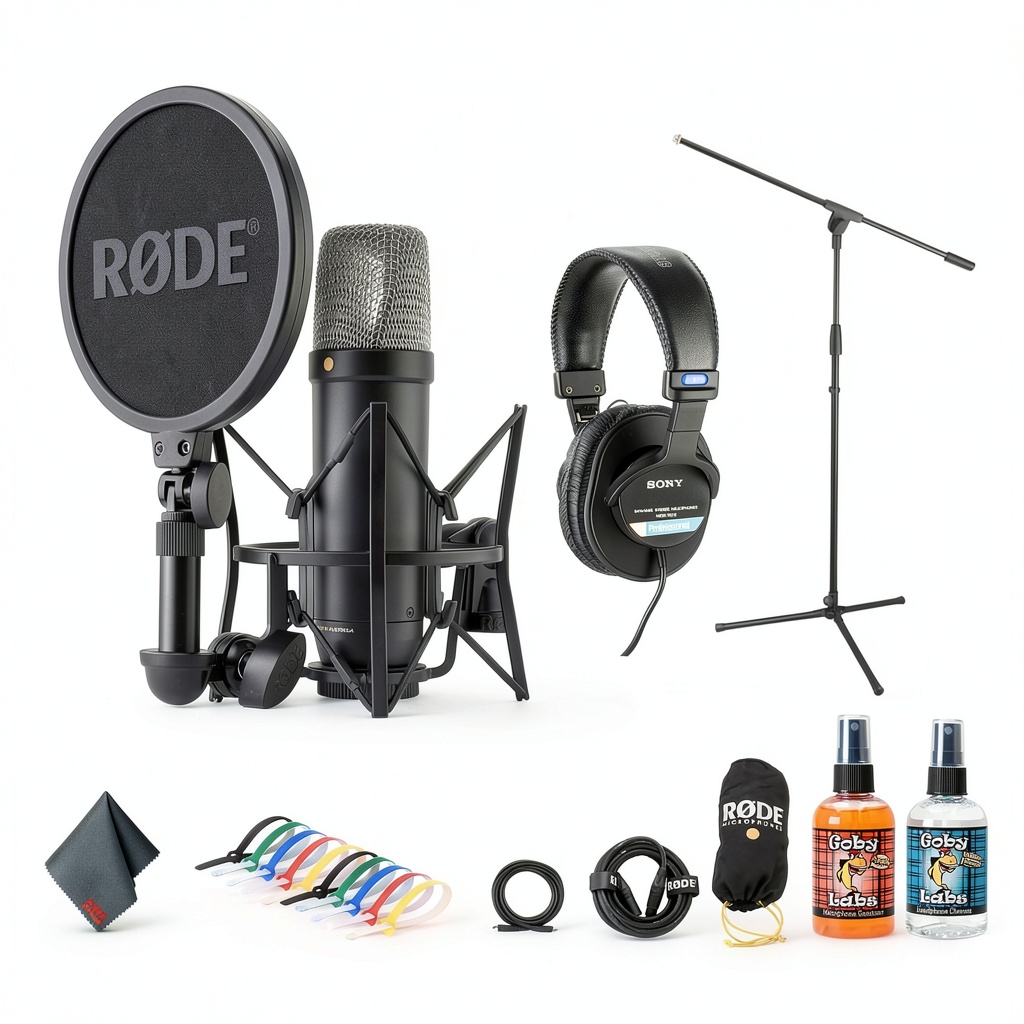
| Included Accessories | SM6 shock mount, pop filter, XLR cable, USB-C cable, headphones |
Real-World Performance & Feature Analysis
Design & Build Quality
Unboxing the NT1 5th Gen feels substantially different from the typical microphone experience. The packaging is premium, but more importantly, the accessories are genuinely useful rather than afterthoughts. The SM6 shock mount is the same professional-grade unit Rade sells separately for $99, and it makes a noticeable difference in isolation compared to generic mounts.
The microphone itself has the classic NT1 aesthetic—satin nickel finish with black grille—but with updated branding. What impressed me most was the weight distribution. At 540g, it’s substantial enough to feel professional but not so heavy that it threatens boom arms. The dual ports on the bottom are cleanly implemented, with clear labeling and sturdy connectors that survived multiple plug/unplug cycles during testing without becoming loose.
Performance in Real Use
I tested the NT1 5th Gen across three realistic scenarios that mirror how most people will actually use it:
Scenario 1: Solo Podcast Recording Using USB connectivity directly into my laptop, the setup was genuinely plug-and-play. Windows, Mac, and iPad all recognized it immediately without drivers. The 32-bit float recording saved me during a particularly dynamic interview where my guest would whisper then suddenly laugh loudly—the headroom prevented clipping that would have ruined a standard 24-bit recording.
Scenario 2: Vocal Recording with XLR Connected to my Audient interface, the NT1 delivered the clean, detailed sound I expect from the NT1 lineage. The 4dBA self-noise is not just a spec sheet number—it’s audible when recording quiet acoustic sources in untreated spaces. Compared to my older NT1-A, the 5th Gen has noticeably less hiss when pushing preamp gain for soft-spoken vocals.
The cardioid pattern is tighter than you might expect. Off-axis rejection is excellent, making it ideal for recording multiple voices in the same room or minimizing computer fan noise. However, this sensitivity means proper microphone technique is essential—plosives and mouth noises are captured with brutal honesty if you’re too close without the pop filter.
Ease of Use
Rode’s software ecosystem is where the NT1 5th Gen separates itself from competitors. Rode Connect provides a streamlined interface for podcasters with built-in effects and multitrack recording, while UNIFY lets you use the microphone as part of a larger Rode ecosystem for streaming.
What matters most isn’t the features themselves but how they’re implemented. The Aphex effects—particularly the Aural Exciter and Big Bottom—are applied at the hardware level when using USB, meaning they don’t add latency or require CPU power. For streamers or podcasters who want professional sound without complicated DAW setups, this is a game-changer.
The learning curve exists primarily for those coming from basic USB microphones. Understanding gain staging, the difference between monitor mix and recording levels, and how 32-bit float affects your workflow takes some adjustment. Rode’s documentation is comprehensive, but there’s still a knowledge gap for absolute beginners.
Durability & Reliability
After two months of daily use, the NT1 5th Gen has shown no signs of wear beyond cosmetic scuffs on the shock mount. The microphone itself feels built to last, though the gold-sputtered capsule requires careful handling—this isn’t a microphone you want to toss in a backpack without proper protection.
The USB-C connector feels secure, but I’d recommend using a magnetic breakaway cable if you frequently move your setup. Unlike XLR connections which are designed for frequent mating, USB-C ports can wear over time with heavy use. This is my only durability concern with an otherwise robust package.
Pros & Cons
Pros:
- True dual-interface functionality without quality compromise
- Exceptionally low self-noise perfect for untreated spaces
- 32-bit float recording provides clipping protection
- Professional-grade included accessories (especially shock mount)
- Seamless software integration for streaming and podcasting
- Consistent performance across USB and XLR modes
Cons:
- Premium price point compared to entry-level USB mics
- Requires careful handling and proper mounting
- Software features require learning curve for beginners
- USB-C port may be less durable than XLR for frequent connecting
- Cardioid pattern is almost too tight for some room recording applications
Comparison & Alternatives
Cheaper Alternative: Audio-Technica AT2020USB+ ($169) The AT2020USB+ has been the go-to USB microphone for years, and it’s still a solid choice for beginners on a budget. However, you’re getting a conventional 16-bit/48kHz converter, higher self-noise (20 dBA vs 4 dBA), and no XLR option. Choose this if: You only need basic USB recording and don’t anticipate upgrading to an XLR setup later.
Premium Alternative: Neumann TLM 102 + High-End Interface ($699 + $300+) The Neumann TLM 102 is a studio benchmark with legendary sound quality. However, you’ll need a quality interface, and you lose the USB convenience. The TLM 102 has slightly more detailed high-end, but higher self-noise (12 dBA). Choose this if: You already own high-end preamps and only work in a traditional XLR studio environment.
The NT1 5th Gen sits in a unique sweet spot—better than entry-level USB mics but more accessible than premium XLR setups. The value isn’t just in the microphone itself but in the complete ecosystem.
Buying Guide / Who Should Buy
Best for beginners: If you’re starting a podcast or YouTube channel and want professional sound without the complexity of audio interfaces, the NT1 5th Gen is arguably the best investment you can make. The bundle includes everything you need, and the USB connectivity means you can start recording immediately while leaving the XLR option for future expansion.
Best for professionals: For location recording or mobile setups where you need both direct-to-computer convenience and interface connectivity, the NT1 5th Gen is incredibly practical. The 32-bit float recording is genuinely useful for documentary work or unpredictable recording environments where you can’t monitor levels closely.
Not recommended for: Live sound reinforcement, field recording in harsh environments, or situations where ultra-wide pickup patterns are needed. The NT1 5th Gen is fundamentally a studio microphone, and while it’s versatile within that context, it’s not designed for every recording scenario.
FAQ
Is the Rode NT1 5th Gen worth the premium over the 4th generation? Absolutely. The dual-interface capability alone justifies the price difference if you need both USB and XLR functionality. The improved self-noise and 32-bit recording are significant upgrades that future-proof your investment.
Can I use both USB and XLR simultaneously? No, the microphone automatically switches between outputs based on which cable is connected. You cannot use both interfaces at the same time, which is actually a good thing—it prevents potential ground loop issues.
How does this compare to the Shure SM7B for podcasting? The SM7B is a dynamic microphone that excels at rejecting background noise in untreated spaces. The NT1 5th Gen is a condenser that captures more detail but requires a quieter environment. Choose the SM7B for noisy home offices, the NT1 for treated spaces where you want maximum clarity.
Do I need an audio interface if I have the USB option? Only if you need to connect multiple microphones or want to use outboard gear. The built-in preamp and converter are high-quality enough that an external interface won’t noticeably improve USB recording quality.
Is the 32-bit recording really necessary? For most studio recordings where you can carefully set levels, it’s insurance rather than a necessity. For field recording, interviews, or any situation with unpredictable volume levels, it can save recordings that would otherwise be unusable due to clipping.